
Excel vs Modern Financial Forecasting: The $6B Mistake
Why Excel spreadsheets are costing your business time and money, and when it's time to upgrade to modern forecasting software.

In May 2012, JP Morgan Chase announced a staggering $6.2 billion trading loss. The culprit? A simple Excel spreadsheet error. A Value-at-Risk model used to assess trading risk contained a flawed formula that went undetected for months, leading to one of the most expensive spreadsheet mistakes in history.
This wasn't an isolated incident. That same year, Barclays accidentally bought 179 contracts it didn't want when hidden rows in an Excel file weren't properly removed before submission. Fidelity Investments once lost $2.6 billion due to a spreadsheet error that omitted a negative sign.
If you're a finance professional or small business owner still managing forecasts in Excel, you might be thinking, "But I'm careful with my spreadsheets." The reality is more sobering: according to research by KPMG, 88% of all spreadsheets contain significant errors—regardless of how careful their creators are.
This article will show you exactly when it's time to move beyond Excel and what modern financial forecasting platforms offer instead.
The 7 Critical Problems with Excel for Financial Forecasting
Excel revolutionized finance when it launched in 1985. For decades, it was the gold standard for financial modeling and forecasting. But in 2025, we're trying to run modern businesses with software designed for a pre-internet world.
1. Version Control Nightmares
You know this scenario: "Budget_2024.xlsx" becomes "Budget_2024_v2.xlsx," then "Budget_2024_v2_FINAL.xlsx," then "Budget_2024_v2_FINAL_updated.xlsx," and eventually the dreaded "Budget_2024_v2_FINAL_REAL_FINAL_USE_THIS_ONE.xlsx."
Without built-in version control, Excel forces teams into chaotic file naming conventions. Even worse, there's no reliable way to track who made what changes or roll back to a previous state. When Sarah from accounting updates the forecast, and Mark from finance makes different updates to his copy, reconciling those changes becomes a nightmare.
Common Mistake
Many teams try to solve this with SharePoint or Google Drive version history, but these only track file saves—not what actually changed inside the spreadsheet. You can see that version 47 was saved at 3:42 PM, but you have no idea what Mark modified without manually comparing formulas.
2. Collaboration is Fundamentally Broken
Excel wasn't designed for collaboration. Yes, you can technically share a workbook or use Excel Online, but these solutions are clunky workarounds, not true real-time collaboration.
When multiple people need to update a financial forecast, you typically:
- Email the file back and forth (creating version chaos)
- Use a shared drive where only one person can edit at a time
- Maintain separate sections that get manually consolidated
- Schedule meetings just to update the spreadsheet together
Meanwhile, your sales team is collaborating in Slack, your developers are working simultaneously in GitHub, and your marketers are co-editing documents in Google Docs. Your financial forecasting—arguably your most important business data—is stuck in the past.
3. Formula Errors Cascade Silently
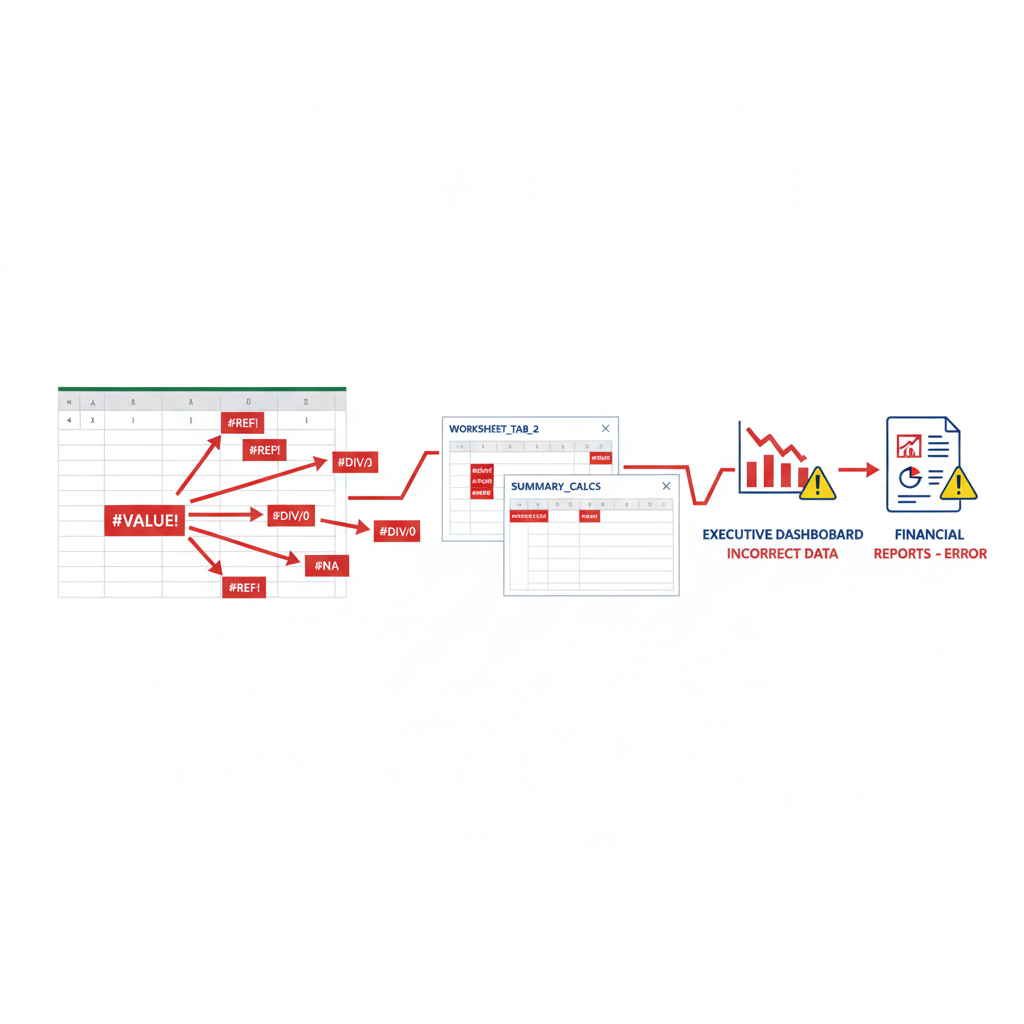
Here's what makes Excel errors so dangerous: they fail silently. A misplaced formula, an incorrect cell reference, or a hidden row can corrupt your entire forecast without any warning.
of spreadsheets contain significant errors
Source: KPMG, 2021
lost by JP Morgan due to Excel error
Source: Bloomberg, 2013
of spreadsheets used in decisions have errors
Source: European Spreadsheet Risks Interest Group
The European Spreadsheet Risks Interest Group studied business spreadsheets and found that 94% of spreadsheets used in critical business decisions contain formula errors. Even more concerning, most of these errors go completely undetected until they cause real financial damage.
Unlike modern platforms with built-in validation, Excel won't tell you:
- When your formula suddenly references the wrong cell
- If you accidentally deleted a row that other formulas depend on
- When copy-pasting broke your carefully constructed calculations
- If your VLOOKUP is returning incorrect data due to unsorted columns
4. Scalability Hits a Wall
Excel starts to break down when you scale beyond basic forecasting:
Performance Issues:
- Large datasets cause crashes and slow calculations
- Complex models take minutes to recalculate
- Files become too large to email (the dreaded "file size too large" error)
Complexity Management:
- Multiple linked workbooks become impossible to maintain
- Trying to track cross-sheet dependencies is a nightmare
- Adding new accounts or departments requires manual formula updates across hundreds of cells
One CFO I spoke with managed 47 linked Excel files for their company's financial forecast. Every month-end close took 3-4 days just to ensure all the links were working correctly. After switching to modern forecasting software, the same process took 2 hours.
5. Security and Compliance Risks
Excel files containing sensitive financial data are typically:
- Emailed as attachments (unencrypted, sitting in dozens of inboxes)
- Stored on shared drives with unclear access controls
- Copied to USB drives and personal computers
- Impossible to audit (who viewed what data when?)
For businesses subject to SOX compliance, GDPR, or other financial regulations, Excel's lack of proper security controls creates serious liability. There's no reliable audit trail, no row-level security, and no way to enforce data retention policies.
Compliance Risk
If you're subject to financial regulations (SOX, GDPR, CCPA), Excel's lack of audit trails and access controls could put your company at risk. One data breach or compliance audit failure can cost more than years of forecasting software subscriptions.
6. Manual Data Entry is a Time Vampire
How much time does your finance team spend on these manual tasks?
- Copying data from bank statements into spreadsheets
- Updating actual vs. forecast comparisons
- Manually categorizing transactions
- Reformatting data from different sources
- Fixing formulas that broke when new rows were inserted
- Creating reports by copying and pasting between workbooks
According to industry research, finance professionals spend an average of 20 hours per month on manual data entry and spreadsheet maintenance. That's 240 hours per year—six full work weeks—spent on tasks that modern platforms automate completely.
wasted on manual spreadsheet work
Source: Industry average
average cost of spreadsheet errors
Source: Coopers & Lybrand study
7. No Real-Time Insights
Financial reality changes daily, but your Excel forecast updates monthly (if you're disciplined). By the time you update last month's actuals and recalculate your forecast, your data is already outdated.
Modern businesses need to answer questions like:
- "Can we afford to hire two more engineers this quarter?"
- "What's our runway if sales decrease 15% next month?"
- "When will we hit $500K in savings?"
- "What happens to our forecast if we land that big client?"
With Excel, answering these questions requires:
- Opening the forecast file
- Updating with latest actuals (manual data entry)
- Adjusting formulas for the scenario
- Recalculating (and waiting for complex models)
- Manually creating charts to visualize results
- Documenting your assumptions in a separate email
By the time you finish this analysis, the business context has likely already shifted.
When to Move Away from Excel
Not every business needs to abandon Excel immediately. But there are clear signals that it's time to upgrade:
Your Team Has Grown
If you have more than 5 people who need regular access to financial forecasts, Excel's collaboration limitations will cost you more in lost productivity than software would cost.
You've Had a Significant Spreadsheet Error
One major error—whether it's a broken formula, deleted row, or version control mix-up—that impacted a business decision should be your wake-up call.
Month-End Close Takes More Than 2 Days
If you're spending days reconciling spreadsheets, consolidating data, and checking formulas, automation will give you massive time savings.
You're Raising Capital or Getting Audited
Investors and auditors want reliable, auditable financial projections. Showing up with "Budget_FINAL_v12.xlsx" doesn't inspire confidence.
Your Forecast Doesn't Influence Daily Decisions
If your forecast sits in a file and only gets updated quarterly, it's not serving its purpose. Modern platforms make forecasts living tools that inform daily decisions.
Is Your Team Ready for Modern Forecasting?
See how automated financial forecasting eliminates errors and saves 20+ hours per month
Try It Free for 30 DaysModern Financial Forecasting: A Better Way
The good news? Modern forecasting platforms solve these problems by design. Let's look at what you gain by upgrading.
Automated Data Integration
Instead of manually entering data:
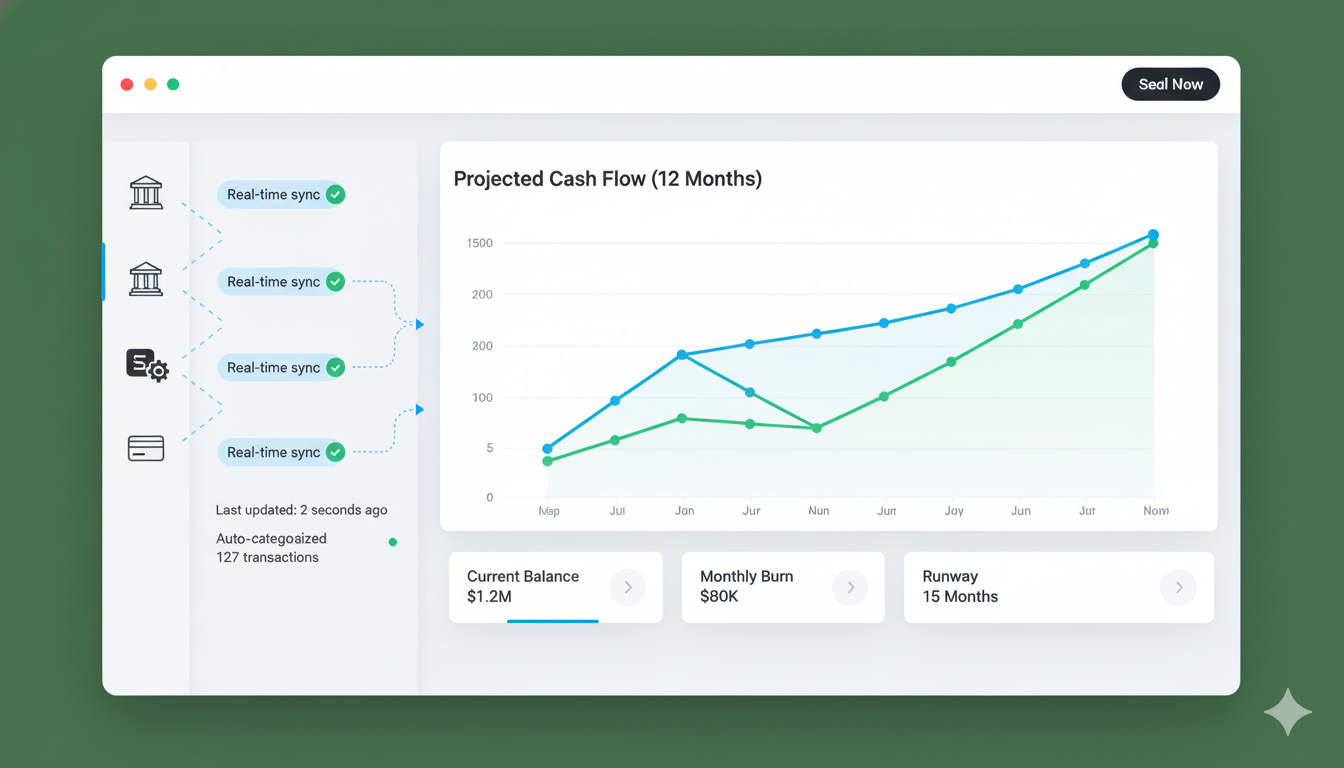
- Direct bank connections: Automatically pull balances and transactions
- Accounting software integration: Sync with QuickBooks, Xero, or your ERP
- Real-time updates: Your forecast reflects reality, not last month's data
- Automatic categorization: AI learns your patterns and categorizes transactions
Built-in Collaboration
Multiple team members can:
- Work simultaneously without conflicts
- See changes in real-time
- Add comments and notes on specific line items
- Control access with role-based permissions (CFO sees everything, department heads see only their budgets)
- Track every change with complete audit history
Intelligent Error Detection
Modern platforms catch errors before they cascade:
- Validation rules: Flag unusual entries automatically
- Balance checks: Ensure debits equal credits, income minus expenses equals net position
- Anomaly detection: AI alerts you to unexpected patterns
- Confidence scoring: See which forecasts are reliable vs. uncertain
Real-World Impact
After switching from Excel to modern forecasting, one mid-size tech company reduced forecast errors from 12% average variance to less than 2%—and cut their forecasting time from 40 hours per month to 6 hours.
Scenario Planning Made Easy
Want to see what happens if:
- Revenue drops 20% next quarter?
- You hire 5 more employees?
- That big client signs the contract?
- Interest rates increase?
Instead of creating duplicate Excel files for each scenario, modern platforms let you:
- Create unlimited scenarios instantly
- Compare scenarios side-by-side
- Save and share scenarios with stakeholders
- Switch between scenarios without losing work
Powerful Visualization
Stakeholders don't want to read spreadsheets—they want to understand trends:
- Interactive charts: Click and drag to explore different time periods
- Customizable dashboards: Each stakeholder sees what matters to them
- Mobile access: Check forecasts from anywhere
- Executive summaries: Auto-generated insights highlight what matters
Complete Audit Trail
Every change is tracked automatically:
- Who made the change
- What they changed (before and after)
- When they changed it
- Why (optional comments)
This isn't just for compliance—it's incredibly useful when you need to understand how your forecast evolved or roll back an incorrect change.
Excel vs Modern Forecasting: Direct Comparison
Feature Comparison: Excel vs Modern Forecasting Software
| Feature | Excel Spreadsheets | Modern Platforms |
|---|---|---|
| Real-time Collaboration | Limited (one editor at a time) | Simultaneous editing |
| Version Control | Manual file naming | Automatic change tracking |
| Error Detection | Manual checking only | Automated validation & alerts |
| Data Integration | Manual data entry | Automatic bank/accounting sync |
| Scenario Planning | Duplicate files needed | Unlimited instant scenarios |
| Mobile Access | Limited (Excel mobile apps) | Full mobile functionality |
| Audit Trail | ||
| Scalability | Crashes with large datasets | Handles unlimited data |
| Security | File-level only | Row-level + encryption |
| Cost | $0-$10/mo per user | $5-$50/mo per user |
Calculating the ROI of Upgrading
Let's break down the actual cost-benefit analysis of moving from Excel to modern forecasting software.
Time Savings
Manual Data Entry & Updates: 10 hours/month
- At $50/hour (conservative finance professional rate): $500/month
Error Correction & Troubleshooting: 5 hours/month
- Fixing broken formulas, reconciling versions, investigating discrepancies: $250/month
Report Generation & Distribution: 5 hours/month
- Creating charts, copying data, emailing updates: $250/month
Total Time Savings: 20 hours/month = $1,000/month in salary costs Annual Savings: $12,000/year (per person)
Error Reduction Value
According to a Coopers & Lybrand study, the average cost of spreadsheet errors is $50,000 per year per organization. This includes:
- Incorrect business decisions based on bad data
- Time spent finding and fixing errors
- Lost opportunities from delayed insights
- Reputation damage from errors in external reports
Modern platforms reduce error rates from 88% to less than 1%, preventing costly mistakes.
Better Decision-Making
While harder to quantify, real-time forecasts enable:
- Faster response to market changes
- More confident strategic planning
- Earlier detection of cash flow issues
- Better resource allocation
CFOs report that moving to modern forecasting improved decision-making quality by enabling "what-if" scenario analysis that was too time-consuming in Excel.
Total ROI Calculation
For a typical 5-person finance team:
Annual Costs:
- Modern forecasting platform: $3,000-$6,000/year (5 users × $50-100/month)
Annual Benefits:
- Time savings: $60,000 (5 people × $12,000)
- Error reduction: $50,000 (prevented mistakes)
- Total Benefits: $110,000/year
Net ROI: $104,000-$107,000/year Payback Period: Less than 1 month
Even for a solo entrepreneur or small business, saving 20 hours per month is worth the modest software cost.
Average return on forecasting software investment
Source: Industry average
Typical payback period for forecasting software
Source: CFO survey data
Making the Transition
Worried about the migration process? Here's what the transition actually looks like:
Step 1: Start with One Account
Most teams begin by tracking one account (like operating cash) in the new platform while maintaining Excel for everything else. This low-risk approach lets you learn the system without committing fully.
Step 2: Add Historical Data
Import 3-6 months of historical transactions so your forecast can learn patterns and provide accurate projections from day one.
Step 3: Set Up Recurring Items
Add your known income and expenses (payroll, rent, subscriptions). Modern platforms make this much simpler than Excel—no formulas required.
Step 4: Compare Side-by-Side
Run both systems in parallel for one month. You'll quickly see which one is giving you better insights and taking less time.
Step 5: Full Migration
Once confident, migrate remaining accounts and sunset your Excel spreadsheets (but keep them archived for historical reference).
Most teams complete this transition in 2-4 weeks without disrupting their normal financial operations.
Migration Support
Most modern forecasting platforms offer migration assistance, including importing your Excel data, setting up recurring transactions, and training your team. You don't have to figure it out alone.
What About Excel's Advantages?
Let's be fair: Excel still has legitimate use cases in finance:
Financial Modeling & Analysis For complex one-time modeling (M&A scenarios, valuation models, custom analyses), Excel's flexibility is still valuable.
Custom Reporting When you need to create specific reports with unusual formatting, Excel remains useful.
Ad-Hoc Calculations Quick calculations, scratch work, and data exploration are still perfect for Excel.
Budgeting Templates For very small businesses or personal finance, simple Excel templates may suffice.
The key insight: Excel is a tool, not a platform. Use it for analysis and modeling, but don't run your core financial forecasting on it. Modern platforms handle operational forecasting while Excel remains in your toolkit for specialized work.
The Bottom Line
Excel served finance well for four decades. But trying to run modern financial forecasting on spreadsheets designed in 1985 is like trying to run a modern business on fax machines and filing cabinets.
The warning signs are clear:
- Version control chaos costing hours every week
- Collaboration headaches slowing down your team
- Hidden errors undermining decision confidence
- Manual data entry consuming 20+ hours per month
- Forecasts too stale to inform daily decisions
Modern forecasting platforms eliminate these problems while saving time, preventing errors, and enabling better decisions. For most businesses, the ROI is overwhelming—often paying for itself in the first month.
The question isn't whether to upgrade—it's how much longer you can afford to wait.
Ready to Eliminate Spreadsheet Errors?
See how automated forecasting saves 20+ hours per month and prevents costly mistakes. Try MyFuture Finance free for 30 days.
Start Your Free TrialSarah Mitchell
Financial Technology Analyst
Former CFO turned fintech advocate with 15+ years in corporate finance and software implementation. Sarah has helped over 50 companies transition from Excel to modern financial platforms, saving them millions in time and error costs.